Turn document piles into a navigable map.
FileCanvas is a desktop workspace for PDF review, evidence linking, and timeline building. Drag files in, extract snippets, connect ideas with labeled arrows, and export clean summaries. Local-first and offline.
See It In Action
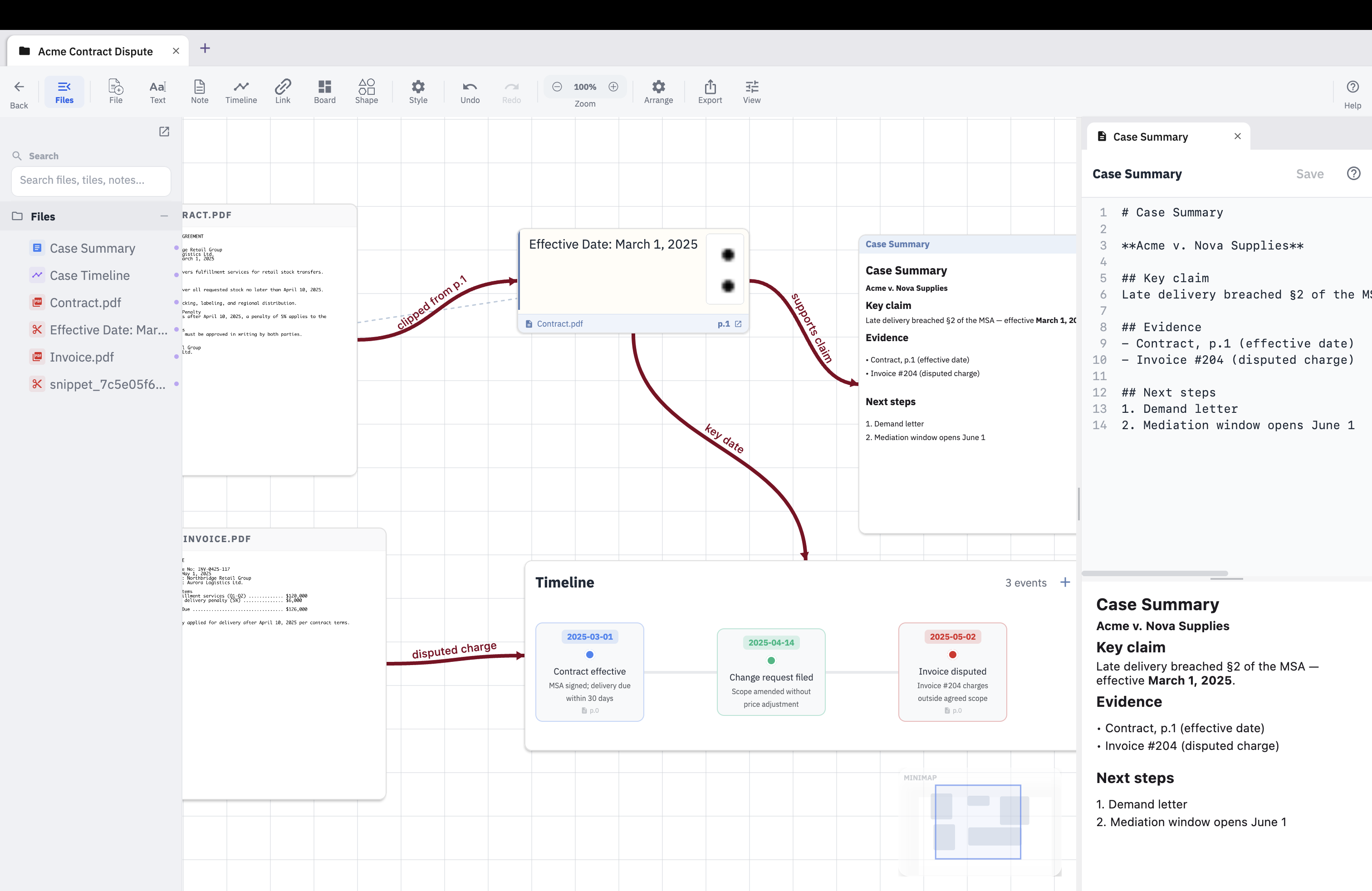
Clip a passage → it pins to your canvas → click it to jump back to the exact source page.
How It Works
Drag PDFs onto the canvas or use batch import for large sets. Each file becomes a visual tile you can arrange spatially.
Open a PDF, highlight key passages, and extract snippets. Pin them to the canvas and link them back to their source.
Create timeline tiles for chronological mapping. Add dates, notes, and link events to source documents.
Export your visual map as PNG/PDF. Generate a connection intelligence report in Markdown with hub analysis, orphan detection, and evidence mapping.
Capture your canvas instantly with the screenshot button for quick sharing and documentation.
Release Updates
Get notified about major releases and new capabilities. No spam.
Pricing
- Every feature, no limits
- Unlimited projects and tiles
- Export: PNG/PDF + connection summary
- Automatic updates included
- FileCanvas is free and stays free
- Would you chip in to fund development?
- No charge today — just tap to let me know
- It helps decide what to build next
Downloads
Latest release (v1.4.0) downloads directly below. The app updates itself automatically, or grab any release manually from GitHub.

All releases: github.com/Jimaloo/filecanvas-downloads/releases
Key Features
Review PDFs with precise region extraction and pin snippets directly to your canvas.
Every snippet stays tethered to its source document — one click jumps back to the exact page.
Build chronological timelines from your documents. Add events with dates and source links.
Draw arrows with labels, snapping, and context actions to keep relationships readable.
Import multiple PDFs and images at once. Files auto-arrange in a grid.
Export canvas as PNG/PDF and connection summaries to Markdown. Updates install automatically.
Latest Updates
New docked Markdown editor with tabs, a live preview, and a built-in guide — double-click a markdown tile to open it. Simpler importing with a single File button for one or many files. Selected PDF and text tiles now scroll their own contents without moving the canvas, and a new safeguard prevents a project from being cleared if it ever fails to load.
One-click canvas screenshots, structured connection intelligence report with hub analysis, board hierarchy navigation, redesigned file tree with content search, snippet comment persistence, expanded folder auto-import (.md/.txt), timeline neutralization, and major performance improvements with smoother pan/zoom.
View Previous Releases
Enhanced user interface with refined components, improved theme configuration, and built-in update checker for seamless app upgrades.
Desktop auto-updater with GitHub Releases, faster arrow rendering, improved persistence, and refined PDF snippet linking.
Timeline tiles, batch import, PDF export, connection summary reports, and improved PDF text extraction.
Core canvas workflow: drag-and-drop files, markdown notes, visual connections, PDF review tools, project organization, and local SQLite storage.
Roadmap
FAQ
Locally on your machine. We don't have a server for your data.
Yes, 100%. It's designed to work primarily offline.
Yes. The desktop app checks GitHub Releases and installs updates when available.
Because FileCanvas is independently developed, you may see a security warning. To open it:
- Right-click the app and select Open.
- If "Open Anyway" doesn't appear, go to System Settings > Privacy & Security and scroll down to the Security section. Click Open Anyway.
- Advanced: Run this in Terminal to remove the warning:
xattr -d com.apple.quarantine /Applications/FileCanvas.app